SharePoint Embedded from Dataverse with Managed Identity
This post extends my earlier managed identity plugin work into SharePoint Embedded.
The goal was to keep the runtime model simple and secure:
- Dataverse custom APIs are the public contract.
- The plugin package uses managed identity to call Microsoft Graph.
- The front-end sample calls Dataverse only.
- No application secrets are stored in the plugin package.
If you need the earlier foundation first, start with these posts:
Set up managed identity for Power Platform Plugins
Power Platform Plugin Package – Managed identity
Power Platform: Front-end Authentication to Power Automate with Custom API
You can find the code on GitHub
Motivation
I wanted a clean building block for SharePoint Embedded that would feel natural from Dataverse.
Instead of sending clients straight to Microsoft Graph, I wanted SharePoint Embedded operations to sit behind Dataverse custom APIs. That gives me a narrow contract for callers, keeps authentication centralized inside the plugin package, and avoids pushing Graph knowledge into every client.
The Pattern
The runtime flow is:
- A caller invokes a Dataverse custom API.
- The plugin acquires a Microsoft Graph token through
IManagedIdentityService. - The plugin calls SharePoint Embedded through Microsoft Graph.
- The plugin returns a Dataverse-friendly payload.
That gives us a strong separation of concerns:
- Dataverse clients talk to Dataverse.
- The plugin talks to Graph.
- Managed identity handles authentication.
Why Custom APIs Work Well Here
Custom APIs give you a stable, business-friendly surface for callers.
In this repo the main SharePoint Embedded building blocks are:
co_SharePointEmbeddedCreateContainerco_SharePointEmbeddedUploadFileco_SharePointEmbeddedGrantAccessco_SharePointEmbeddedRevokeAccessco_SharePointEmbeddedCreateContainerWithFileco_SharePointEmbeddedListContainersco_SharePointEmbeddedListDeletedContainersco_SharePointEmbeddedGetContainerDetailsco_SharePointEmbeddedDeleteContainerco_SharePointEmbeddedRestoreContainer
The most useful starting point is co_SharePointEmbeddedCreateContainerWithFile.
That API creates a container, applies initial membership, uploads the first file, and returns a serialized container snapshot. For many solutions, that is enough to get to a complete first workflow very quickly.
Managed Identity in the Plugin
The core Graph client acquires its token directly from the Dataverse managed identity service:
var identityService = (IManagedIdentityService)localPluginContext.ServiceProvider.GetService(typeof(IManagedIdentityService));
var token = identityService.AcquireToken(new List<string> { "https://graph.microsoft.com/.default" });
That is the key point of the whole approach.
There are no Graph client secrets in the plugin package. Authentication stays in the managed identity layer, which is exactly where I want it for a public foundation.
SharePoint Embedded Access Model
I deliberately kept the access model simple.
The important part for this sample is that container permissions apply to everything inside the container. That gives you a clean way to create containers with granular access boundaries and keep the permission model straightforward.
It also keeps the public sample focused on Microsoft Graph v1.0 endpoints.
One Lightweight Setup Script
I did not want the public repo to turn into an internal run book.
The only SharePoint Embedded setup script I kept for this slice is the lightweight permission grant for the runtime managed identity:
pwsh ./GrantManagedIdentitySharePointEmbeddedRuntimeAccess.ps1 \
  -TenantId '<tenant-id>' \
  -OwningAppId '<owning-app-id>' \
  -ManagedIdentityAppId '<managed-identity-app-id>' \
  -ManagedIdentityServicePrincipalId '<managed-identity-service-principal-id>' \
  -ContainerTypeId '<container-type-id>' \
  -OwningAppClientSecret '<client-secret>'
That script assigns the Graph application permissions needed by the runtime identity and grants access to the registered container type.
For container type creation, tenant registration prerequisites, and billing, I would rather point people to Microsoft documentation than publish tenant-specific automation.
Front-End Workbench
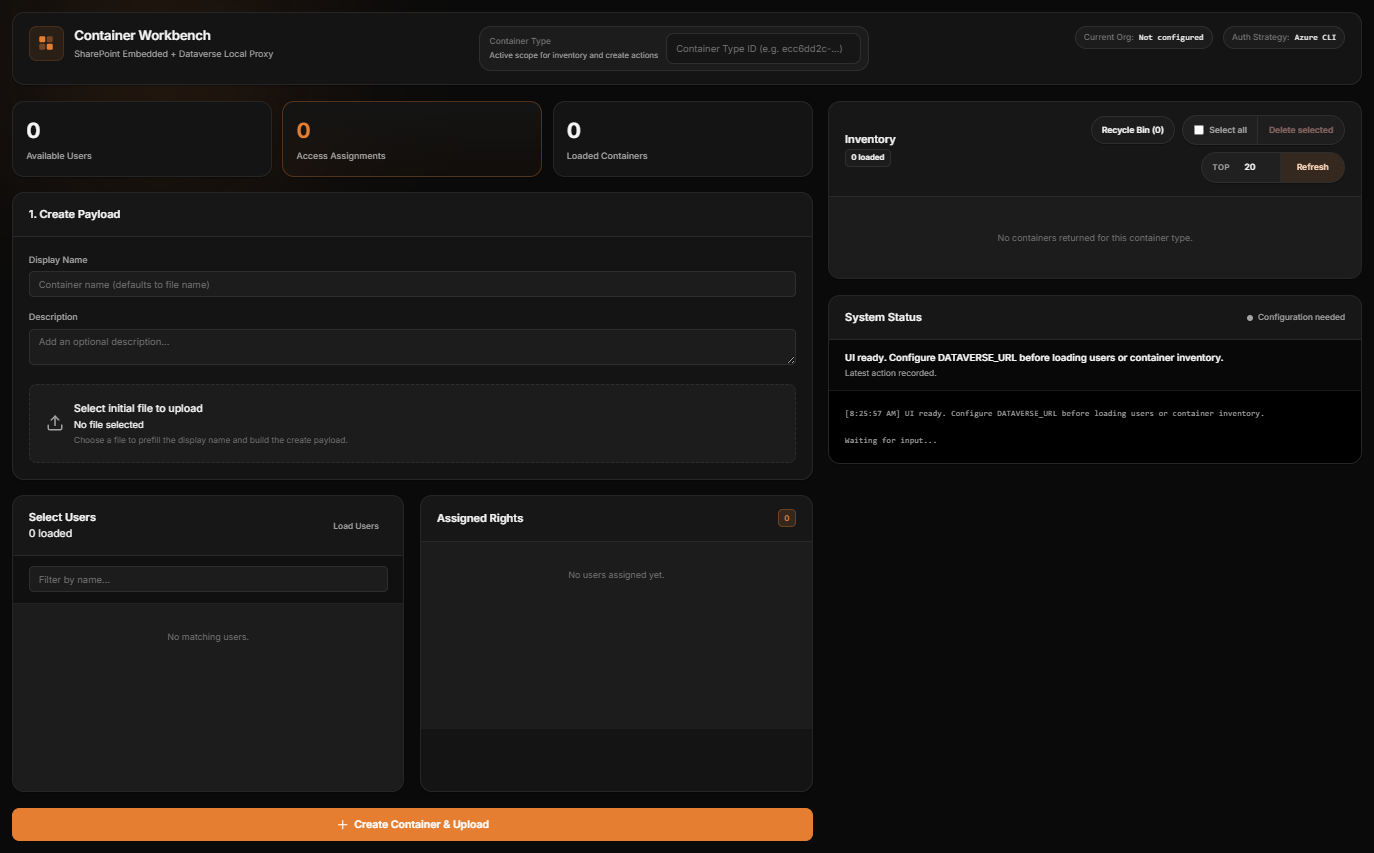
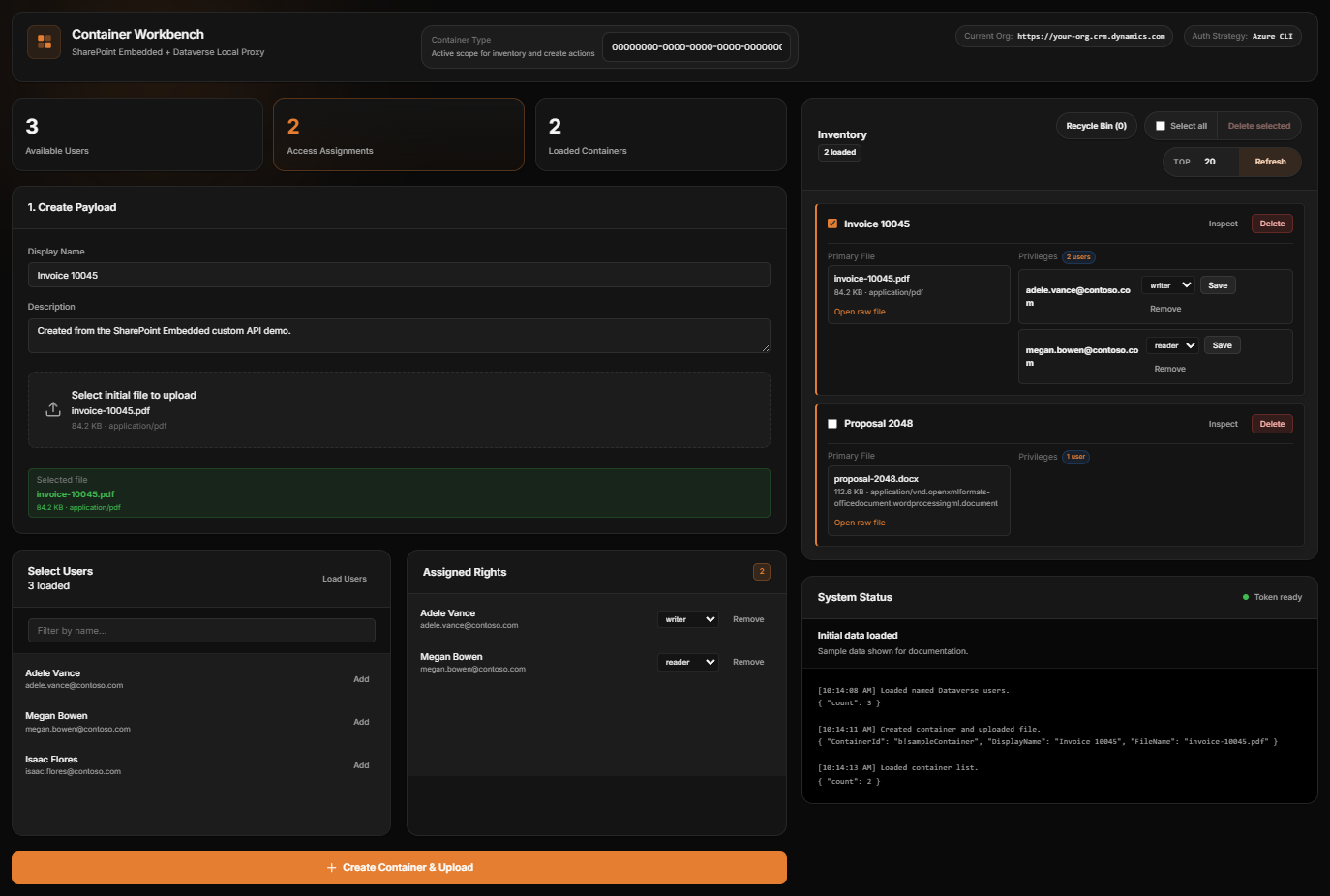
To make the pattern easier to understand, I also kept a small local workbench.
The important part is what it does not do.
It does not call Microsoft Graph directly.
It talks to Dataverse only, which makes it a good demonstration of the intended layering. It can:
- create a container with an initial file
- assign container roles to users
- list active containers
- inspect container details
- browse deleted containers
Here is the workbench shell:
And here is the same workbench shown with safe sample data for documentation purposes:
Example Client Call
Because the contract is a Dataverse custom API, the client side stays simple.
A front-end caller can post directly to the custom API endpoint:
const response = await fetch("/api/data/v9.2/co_SharePointEmbeddedCreateContainerWithFile", {
  method: "POST",
  headers: {
    "Content-Type": "application/json",
    "OData-Version": "4.0",
    "OData-MaxVersion": "4.0",
    Accept: "application/json"
  },
  body: JSON.stringify({
    ContainerTypeId: "<container-type-id>",
    DisplayName: "Invoice 10045",
    FileName: "invoice-10045.pdf",
    FileContentBase64: "<base64>",
    PermissionsJson: JSON.stringify([
      { userPrincipalName: "adele.vance@contoso.com", role: "writer" },
      { userPrincipalName: "megan.bowen@contoso.com", role: "reader" }
    ])
  })
});
That is a much better boundary for a Dataverse solution than pushing Graph logic into every client.
Repo Structure
I also reorganized the source so the plugin code is grouped by domain:
Domains/SharePointEmbeddedDomains/BlobStorageDomains/KeyVaultDomains/PowerAutomateInfrastructure
That makes the SharePoint Embedded slice easier to review as a focused addition to the repo, instead of another flat list of plugin classes.
Conclusion
The main thing I wanted from this work was a reusable foundation.
Not a giant framework. Not a tenant-specific proof of concept. Just a clean pattern that someone else can pick up and extend:
- Dataverse custom APIs as the contract
- managed identity for authentication
- SharePoint Embedded behind a focused plugin layer
- a small front-end workbench to demonstrate the flow
That combination feels like a strong base for SharePoint Embedded from Dataverse.
If you build on it, I’d keep the same discipline: keep the client simple, keep Graph behind the plugin, and keep secrets out of the runtime package.